Establishing communication between a PC and a robot controller is a critical aspect of modern robotics, enabling users to send commands, receive feedback, and monitor the robot's performance. As a leading supplier of robot controllers, we understand the importance of seamless communication in optimizing robotic operations. In this blog, we will explore the steps and techniques required to establish effective communication between a PC and a robot controller, highlighting the solutions we offer to simplify this process.
Understanding the Basics of Communication
Before delving into the setup process, it is essential to understand the fundamental concepts of communication between a PC and a robot controller. There are two primary types of communication: serial and network. Serial communication involves the transfer of data one bit at a time over a single communication line, while network communication allows for the simultaneous transfer of multiple bits over a network of interconnected devices.
Serial communication is typically used for short-distance communication between a PC and a robot controller, offering simplicity and reliability. On the other hand, network communication is suitable for long-distance communication and allows multiple devices to communicate simultaneously, providing greater flexibility and scalability.
Selecting the Right Communication Interface
The first step in establishing communication between a PC and a robot controller is to select the appropriate communication interface. The choice of interface depends on several factors, including the type of robot controller, the distance between the PC and the controller, and the required data transfer rate.
Serial Interfaces
Serial interfaces, such as RS-232, RS-485, and USB, are commonly used for connecting a PC to a robot controller. RS-232 is a standard serial communication protocol that supports data transfer rates of up to 115,200 baud and is suitable for short-distance communication. RS-485, on the other hand, is a differential serial communication protocol that supports longer distances and higher data transfer rates, making it ideal for industrial applications. USB is a widely used interface that offers high-speed data transfer and plug-and-play functionality, making it easy to connect a PC to a robot controller.
Network Interfaces
Network interfaces, such as Ethernet and Wi-Fi, are increasingly being used for connecting a PC to a robot controller, especially in applications where long-distance communication or multiple device connectivity is required. Ethernet is a wired network protocol that supports high-speed data transfer and is commonly used in industrial automation and robotics. Wi-Fi is a wireless network protocol that offers greater flexibility and mobility, allowing the PC to communicate with the robot controller from a distance.
Configuring the PC and Robot Controller
Once the communication interface has been selected, the next step is to configure the PC and the robot controller to establish communication. This involves installing the necessary drivers and software on the PC and configuring the communication settings on both the PC and the robot controller.
Installing Drivers and Software
The first step in configuring the PC is to install the drivers and software required to communicate with the robot controller. The drivers are software programs that enable the PC to recognize and communicate with the communication interface, while the software provides a user interface for sending commands and receiving feedback from the robot controller.
Most robot controllers come with a set of drivers and software that are compatible with popular operating systems, such as Windows, Linux, and macOS. These drivers and software can be downloaded from the manufacturer's website and installed on the PC following the provided instructions.
Configuring Communication Settings
After installing the drivers and software, the next step is to configure the communication settings on both the PC and the robot controller. This involves setting the baud rate, data bits, stop bits, and parity for serial communication or the IP address, subnet mask, and gateway for network communication.
The communication settings should be configured to match the settings on the robot controller to ensure successful communication. The robot controller's user manual provides detailed instructions on how to configure the communication settings, and most controllers also offer a configuration tool that simplifies the process.
Establishing Communication
Once the PC and the robot controller have been configured, the next step is to establish communication between the two devices. This involves sending a test command from the PC to the robot controller and verifying that the robot controller receives and responds to the command.
Sending a Test Command
To send a test command from the PC to the robot controller, open the communication software installed on the PC and enter the test command. The test command should be a simple command that the robot controller can easily understand, such as a command to move the robot forward or backward.
Verifying the Response
After sending the test command, wait for the robot controller to respond. The response should be displayed on the communication software installed on the PC. If the robot controller does not respond, check the communication settings on both the PC and the robot controller to ensure that they are configured correctly. Also, check the physical connections between the PC and the robot controller to ensure that they are secure.
Troubleshooting Communication Issues
If you encounter any issues while establishing communication between the PC and the robot controller, there are several steps you can take to troubleshoot the problem.
Check the Physical Connections
The first step in troubleshooting communication issues is to check the physical connections between the PC and the robot controller. Make sure that all cables are properly connected and that there are no loose connections or damaged cables.
Verify the Communication Settings
The next step is to verify the communication settings on both the PC and the robot controller. Make sure that the baud rate, data bits, stop bits, and parity for serial communication or the IP address, subnet mask, and gateway for network communication are configured correctly.


Check the Drivers and Software
If the physical connections and communication settings are correct, the next step is to check the drivers and software installed on the PC. Make sure that the drivers are installed correctly and that the software is compatible with the operating system and the robot controller.
Contact Technical Support
If you are still unable to establish communication between the PC and the robot controller, contact the technical support team of the robot controller manufacturer. They can provide further assistance and help you diagnose and resolve the issue.
Our Robot Controller Offerings
As a robot controller supplier, we offer a wide range of high-quality robot controllers that are designed to simplify the process of establishing communication between a PC and a robot. Our robot controllers support various communication interfaces, including serial and network interfaces, and come with easy-to-use software and configuration tools that make it easy to configure and establish communication.
- Cleaning Robot Controller Board: Our cleaning robot controller board is designed specifically for cleaning robots, offering precise control and reliable communication. It supports multiple communication interfaces, allowing for seamless integration with a PC.
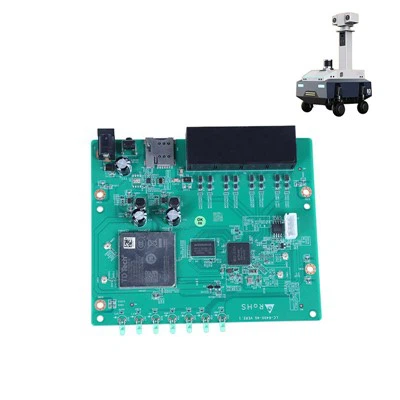
- Patrol Robot Controller Board: Our patrol robot controller board is ideal for patrol robots, providing advanced features and robust communication capabilities. It is designed to handle the demands of long-distance communication and multiple device connectivity.
Contact Us for Procurement
If you are interested in purchasing our robot controllers or need further assistance in establishing communication between a PC and a robot controller, please contact us. Our team of experts is ready to help you select the right controller for your application and provide you with the support and guidance you need to ensure successful implementation.
References
- Johnson, R. (2018). Robotics Programming: Communication Protocols. CRC Press.
- Smith, A. (2020). Industrial Automation: Connecting Devices and Systems. Wiley.
- Brown, C. (2019). Robotic Systems: Design and Implementation. McGraw-Hill.